
How to Register For Wisdome's Free Plan
Note: New demo videos are coming soon. Please refer to the visual guides and steps provided below in the meantime.
The Process:

Enter the following information:
Name
Email
Business name
Country
Phone number
Password (This is where you create your password)
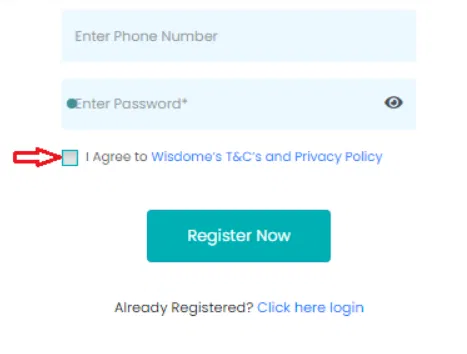
3. Review the 'T&C's and Privacy Policy.' Then, check the box labelled "I agree to Wisdome's T&Cs and Privacy Policy" to confirm your consent.
4. Click 'Register Now.'

5. Verify Your Email: Go to your email inbox and look for a 4-digit verification PIN from no-reply@wisdome.site. Return to the registration page and enter the verification code into the required field.
6. Click "Verify Now" to confirm your email address.
7. You'll see a prompt to take a tour. You may proceed by clicking ‘Get Started’, or click ‘Show me later’ to skip it and move on to the next step.

8. Click on the '3 Step Setup' button. This will direct you to Wisdome's subscription plans.

10. Select the 'Subscribe for Free' plan.
11. Click ‘Ok’.
12. Update your business details by entering the following information:
Address
Phone number
Company email address
Website

13. Agree to the ‘Terms of Use and Privacy Policy’. Click ‘Next’.
14. Update Your Personal Admin Profile, which includes:
Profile image (200 X 200px)
Name: Make sure your name is listed correctly.
Title/Position
15. Click 'Finish'.
Well done! You may now start creating your membership levels or begin uploading content.