
How to Update Your Business/Hub Details
Watch our Demo 👇

1. Log in to your account through this link: https://partner.wisdome.site/login.
2. Navigate to ‘Settings’ > ‘My Business’ > ‘Business/Hub Details.'
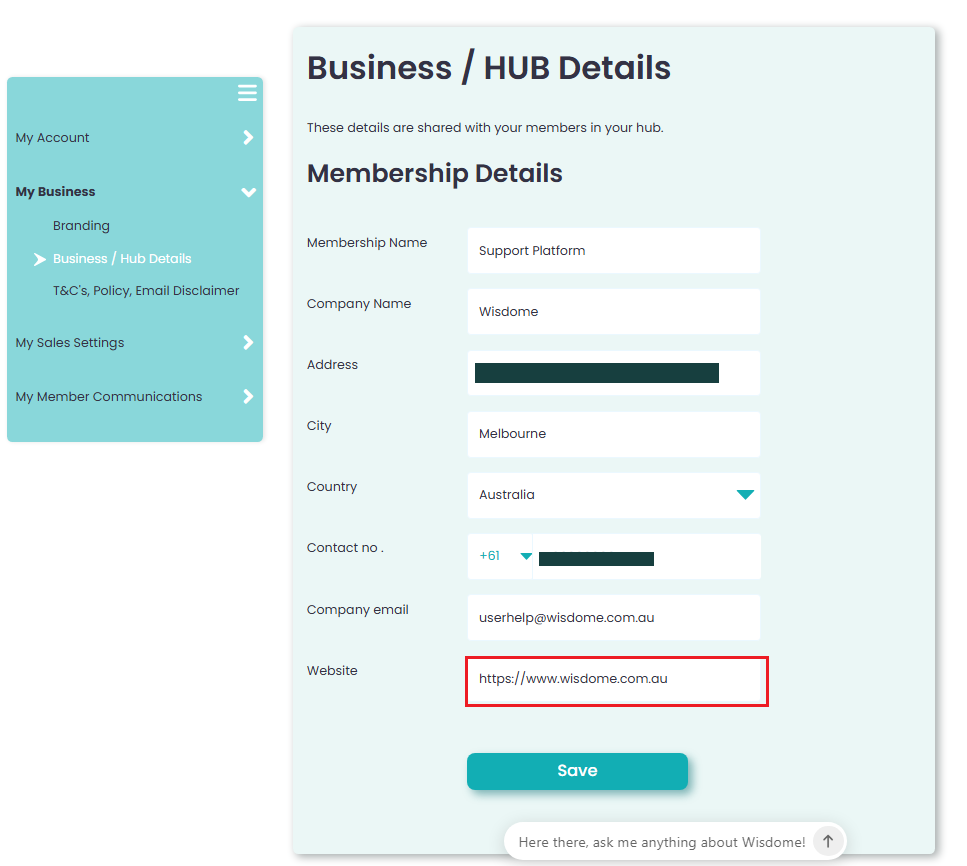
3. Update any of the following information:
Membership Name
Company Name
Address
Contact Number
Company Email
Website > ⚠️ IMPORTANT: Please include the https:// prefix in your website address (e.g., https://www.wisdome.com.au). Omitting the prefix will result in an "Invalid URL" system error.
4. Click 'Save.'
You may also update your social media links on this screen.

You may add links to the following social media accounts.
Facebook
Instagram
LinkedIn
Click 'Save.'
You may also update your Copyright Footer (if needed)

Enter your copyright footer, for example: Copyright Wisdome.com.au © 2024 All Rights Reserved."
Make sure to hit ‘Save’ so your changes are applied.